
To link Kakao Talk Consultation, the following information is required.
(For demo creation, you must create a developer channel)
1. Kakao Channel Information (Required)
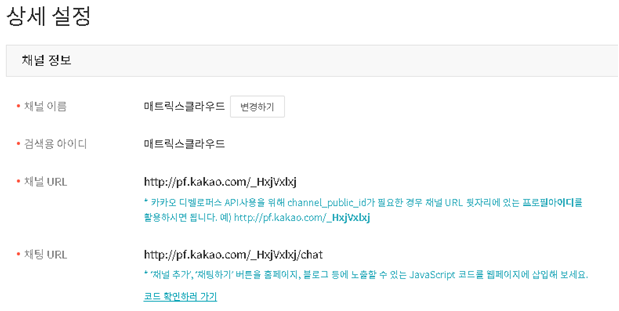
To support channel linking, please provide the channel information in the Kakao Channel Manager Center under ‘Management > Detailed Settings’ or add the account of the Kakao Talk Consultation person in charge at MatrixCloud (woosok123@naver.com) as an administrator of the channel.
2. Application for Business Channel Certification for Kakao Channel (Required)
To use Kakao Talk Consultation, you must obtain business certification for the Kakao Channel.
This can be done in the Kakao Channel Manager Center under ‘Management > Apply for Business Channel’.
3. For demo configuration, open a developer channel (Applicable only for demo use)
Kakao Channel can separately open a channel for developers.
Please access the Channel Manager Center (https://center-pf.kakao.com/profiles) to create a developer channel and then provide the information from step 1.
If you have any questions, please email support@matrixcloud.kr.
Comments
0 comments
Please sign in to leave a comment.